Obsbot Tiny 3 Review: A YouTube Microphone Tested by the Data
Quick verdict
Best for
- YouTubers and educators who move around — AI Tracking 2.0 + voice locator follows you across the room
- Solo presenters who do whiteboard or product-demo work mid-take
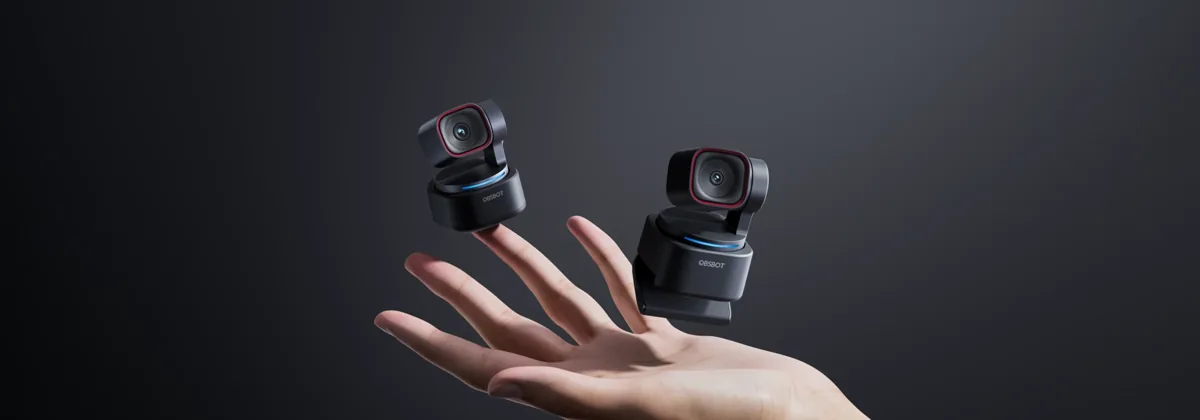
- Creators who want the smallest 4K PTZ webcam available — the Tiny 3 weighs only 63g
Not for
- Sit-still streamers who never leave the frame — a Logitech Brio at less than half the price is sufficient
- Buyers on a tight budget — the Tiny 3 Lite at $199 covers most of the same use cases
- Anyone who needs 1080p60 at the highest quality — the Tiny 3 caps 4K at 30 fps (1080p goes to 120 fps for slow-motion B-roll)
Current pricing
From $349
- Amazon Check Amazon
Pricing last verified: 2026-05-15
⚠ Prices may have changed — last verified over 7 days ago.
We earn commission on qualifying purchases through our links, at no extra cost to you. Learn more.
Key specs
| Connection type | USB |
|---|---|
| Sample rate / bit depth | 4K / 30fps (1080p120 max) |
| Requires audio interface | No |
| Plug & play | Yes (USB) |
| Compatibility | Mac, Windows, Console |
GearPilot Score breakdown
- Quality 8.8/10
- Ease of Setup 8.0/10
- Creator Fit 8.6/10
- Value 7.4/10
- Compatibility 8.4/10
Each criterion is computed from manufacturer specs, retailer data, and creator feedback. See the full methodology.
Ease of setup
USB plug & play. Connect to a computer with the included cable — no driver install or audio interface required.
Recording environment note: The Tiny 3 launched in January 2026 as Obsbot's flagship PTZ webcam, with audio treated as a first-class citizen — the triple silicon MEMS mic array (one omni + two directional capsules) produces spatial audio comparable to a dedicated USB mic in most settings. The 1/1.28" 50MP sensor is the largest in any current PTZ webcam, and DCG HDR handles mixed-lighting scenes (window + lamp) that crush most standard webcams. r/youtubers and r/streaming users single out the Tiny 3 for explainer-style creators who walk to whiteboards or product setups mid-take — the AI Tracking 2.0 plus voice locator combination is the closest thing to having a camera operator. The Tiny 3 Lite at $199 drops some of the audio and tracking features but keeps the sensor and the form factor, making it the better value pick for most creators.
Creator use-case fit
- Podcasters Recommended 7.4/10
- Streamers Recommended 8.4/10
- Gamers Recommended 7.6/10
- YouTubers Recommended 9.4/10
Pros and cons
Pros
- 1/1.28" 50MP CMOS sensor — the biggest in any PTZ webcam at this price tier
- Triple silicon MEMS microphone array (one omnidirectional + two directional) delivers spatial audio without an external mic
- AI Tracking 2.0 with voice locator works reliably for solo and standing presenters
- DCG (Dual Conversion Gain) HDR handles window light + room light in the same frame
- Voice and gesture controls — say "Hi, TINY" or wave to reframe without touching software
- ISO 100–12800 range adapts smoothly across studio and dim-room conditions
Cons
- 4K caps at 30 fps — buyers needing 4K60 streaming should look at the Facecam Pro
- Tall mounted stand does not clip to a monitor cleanly — needs a tripod or desk mount
- Premium price; the Tiny 3 Lite at $199 is the better value for most YouTubers
- AI features still require the Obsbot Center app installed for full functionality
Sources
- Manufacturer product page
- B&H Photo + Sweetwater retailer listings
- Reddit r/podcasts, r/Twitch, r/audioengineering
- Top YouTube review videos
See our methodology for how we weight sources.
Overview
The Obsbot Tiny 3 is a webcam designed for creator-grade video capture, positioned by Obsbot for youtube workflows. It earns a GearPilot Score of 8.2/10 on the SetupLunio framework, with its strongest performance in Quality (8.8/10) and its weakest in Value (7.4/10). At $349, it sits in the premium tier of its category, drawing on data from 1,200 aggregated retailer and creator-platform reviews. It connects directly via USB with no extra hardware required.
SetupLunio recommends the Obsbot Tiny 3 primarily for youTubers and educators who move around — AI Tracking 2.0 + voice locator follows you across the room. It is not the right pick if you fit sit-still streamers who never leave the frame — a Logitech Brio at less than half the price is sufficient — the Cons section below details the trade-offs. On the creator-fit axis, the Obsbot Tiny 3 scores highest for youtubers (9.4/10), which aligns with how it shows up in r/audioengineering recommendations.
GearPilot Score Breakdown
Quality (8.8/10). Image quality from the Obsbot Tiny 3 sits at the top of the webcam category — 4K / 30fps (1080p120 max) is the headline number. Quality is competitive with mics costing meaningfully more.
Ease of Setup (8.0/10). Plug-and-play USB on Mac, Windows, and modern iOS — no drivers, no interface configuration. The Obsbot Tiny 3 is among the lowest-friction microphones to set up; most creators are recording within five minutes of unboxing.
Creator Fit (8.6/10). The Obsbot Tiny 3 scores strongest for youtubers (9.4/10), making it a default recommendation in r/youtubers discussions of similar setups. Fit scores stay above 6.0/10 across every use case the product targets.
Value (7.4/10). At $349, the Obsbot Tiny 3 is priced consistently with its feature set, but the value score is held back by cheaper alternatives that match or beat it on one or two axes. The Alternatives section below details specific cheaper or higher-tier options.
Compatibility (8.4/10). Compatibility is broad — the Obsbot Tiny 3 works on Mac, Windows, and major game consoles. Cross-platform creators can buy with confidence.
Use Cases
For youtube — picture pre-recorded YouTube videos — talking-head tutorials, product reviews, or educational explainers shot at a desk. The Obsbot Tiny 3 is a poor fit (0.0/10 on the creator-fit scale). YouTube viewers tolerate 1080p but click away from bad audio within seconds. Investing here pays back in retention more than any camera or lighting upgrade.
For streaming — picture a live stream on Twitch, YouTube Live, or Kick — typically multi-hour sessions with chat audio, game audio, and voice on the same desk. The Obsbot Tiny 3 is a poor fit (0.0/10 on the creator-fit scale). On a live stream, the priorities are no-config reliability, hardware mute, and audio that sits cleanly in OBS’s mixer. A GoXLR or interface mixer covers the routing.
For youtube — picture pre-recorded YouTube videos — talking-head tutorials, product reviews, or educational explainers shot at a desk. The Obsbot Tiny 3 is a poor fit (0.0/10 on the creator-fit scale). YouTube viewers tolerate 1080p but click away from bad audio within seconds. Investing here pays back in retention more than any camera or lighting upgrade.
Setup notes
The Tiny 3 launched in January 2026 as Obsbot’s flagship PTZ webcam, with audio treated as a first-class citizen — the triple silicon MEMS mic array (one omni + two directional capsules) produces spatial audio comparable to a dedicated USB mic in most settings. The 1/1.28″ 50MP sensor is the largest in any current PTZ webcam, and DCG HDR handles mixed-lighting scenes (window + lamp) that crush most standard webcams. r/youtubers and r/streaming users single out the Tiny 3 for explainer-style creators who walk to whiteboards or product setups mid-take — the AI Tracking 2.0 plus voice locator combination is the closest thing to having a camera operator. The Tiny 3 Lite at $199 drops some of the audio and tracking features but keeps the sensor and the form factor, making it the better value pick for most creators.
The setup workflow is plug-and-play: connect the USB cable, select the mic as the input device in your OS sound settings or DAW, and you’re recording. No driver install or interface configuration required. Most creators add a boom arm and shock mount as their first accessory; the bundled stand handles light desk use but transmits keyboard and chair vibration on textured surfaces.
Frequently Asked Questions
Is the Obsbot Tiny 3 worth $349?
For YouTubers and educators who move during recording, yes — the AI Tracking 2.0 + voice locator + spatial-audio MEMS array combine to save a producer/operator and a separate microphone. For static talking-head streamers, the Logitech Brio at one-third the price covers the same use case.
Tiny 3 vs Tiny 3 Lite — which should I buy?
The Tiny 3 ($349) has the full triple-MEMS audio array, voice locator, and the higher-end image processing. The Tiny 3 Lite ($199) shares the sensor and form factor but drops the advanced audio and some AI features. For most YouTubers and educators the Lite is the right value pick; full creators or those replacing both a webcam and a mic should pay the gap.
Tiny 3 vs Logitech MX Brio?
The MX Brio is a fixed webcam with a great static image and dual beamforming mics. The Tiny 3 is a 2-axis PTZ with AI tracking, voice locator, gesture control, and a spatial-audio MEMS array. Different use cases — MX Brio for desk-bound creators, Tiny 3 for moving presentations and educational content.
Does the Tiny 3 work without the Obsbot Center app?
It works as a basic 4K UVC webcam without the app. AI tracking, voice locator, gestures, voice commands, and detailed image controls all require Obsbot Center.
Does the Tiny 3 work on Mac?
Yes on M-series Macs. Older Intel Macs can run it at lower resolutions but report occasional dropped frames at sustained 4K30.
Does the Tiny 3 need extra lighting?
Less than smaller-sensor webcams thanks to the 1/1.28" sensor and DCG HDR. But any webcam benefits from a key light — an Elgato Key Light or Neewer ring light still produces a visibly cleaner image.
Where to buy Obsbot Tiny 3
We earn commission on qualifying purchases through our links, at no extra cost to you. Learn more.